



How to root Samsung Galaxy S10 Plus 1TB.
Mobiles >> Samsung >> Samsung Galaxy S10 Plus 1TB| Specifications | Reviews | Secret codes |
| Unlock phone | Root phone | Bypass FRP |
| Backup | Flash Firmware | Screenshot |
How to root Samsung Galaxy S10 Plus 1TB?
There is a lack of functionality on your Android smartphone Samsung Galaxy S10 Plus 1TB? You want to get root access on this smartphone?What is Root Android?
Root, or as it is also called the superuser, is needed to extend the functionality of the Android operating system.
In particular, on Unix and Android OS, users who perform actions (watching video, listening to audio, editing documents), work with the rights of guests, then they cannot edit or change / delete / modify system files, increase functionality. In the system, only the main administrator or as he is called the superuser (root) has this function.
What features does Root have on Android:
- Install third-party firmware, and custom ROMs.
- Remove unwanted advertising from applications.
- Remove apps and ringtones installed from the factory.
- Ability to modify system files: Recovery image, Bootloader.
- Increase the battery life.
- Increase the performance of android applications.
- Use a memory card to install applications.
What are the dangers of getting root access?
- A rooted phone cannot be repaired under the lost warranty.
- You will lose the ability to update the software on your phone.
- Your phone may break during this operation.
There are several universal tools that automate the root process and make them available to even the most novice users. One of the most famous is "Framaroot". This program allows you to root a very large number of different devices. And even if the name of your gadget is not listed in the list of supported ones, it still makes sense to try, because the probability of getting root is quite high.
Please charge and restart your phone before starting the operation.
To get root through the "Framaroot" program, follow these steps.
1. You need to download and install the latest version of the 'Framaroot' app on your phone.
2. Run the program. If your phone can be rooted, you will see a drop-down list of possible actions.
3. Choose one of the two options and wait for the message on the screen about the rooting result. If one method doesn't work, choose another..
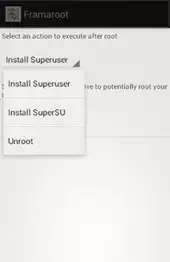
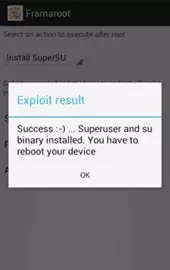
4. As soon as you receive a notification on the screen that the phone has been successfully rooted, restart the device.
Summary: OS: Android v9.0 (Pie); Chipset: Samsung Exynos 9 Octa 9820; CPU: Octa core (2.73 GHz, Dual core, M4 Mongoose 2.31 GHz, Dual core, Cortex A75 1.95 GHz, Quad core, Cortex A55); Architecture: 64 bit; Custom ui: Samsung One UI; RAM: 12 GB; GPU: Mali-G76 MP12; Screen Size: 6.4 inches; Screen Resolution: 1440 x 3040 pixels; Screen type: Dynamic AMOLED; Pixel density: 526 ppi; Aspect ratio: 19:9; Screen to body ratio calculated: 87.11 %; Bezelless display: Yes with punch-hole display; Refresh rate: 60 Hz; Touch screen: Yes Capacitive Touchscreen, Multi-touch; Screen protection: Corning Gorilla Glass v6; Internal memory: 1 TB; Expandable memory: Yes Up to 512 GB; Front camera: 10 MP 8 MP; Main cam ...
 | Tarik Tonkov Mobile technology specialist |
| Tarik Tonkov is a computer scientist and programmer turned tech journalist with a keen interest in the world of smartphones and tablets. He previously wrote for Android Life and was also a ghostwriter for several technology and automotive publications. He appreciates the reliability and beauty of smartphones, the symbiosis of characteristics and usability. In his free time, Tarik likes to travel by car and polish his programming skills to create small useful programs. | |
Comments, Questions and Answers about Samsung Galaxy S10 Plus 1TB
Ask a question about Samsung Galaxy S10 Plus 1TB
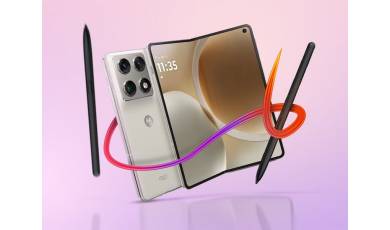
Motorola unveiled its new foldable phone back in January, but the release date and price of the new model remained unclear. Finally, both details have been revealed?and, as expected, the device is quite pricey.
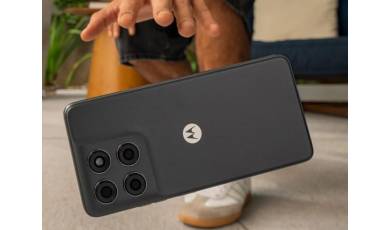
Motorola has expanded its G-series lineup with the introduction of the G37 and G47 smartphones. Both new models offer improved specifications compared to their predecessors, featuring increased battery capacity, enhanced display performance, and a higher IP rating.
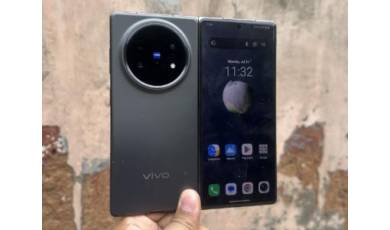
Well-known insider Digital Chat Station has revealed the specifications of the yet-to-be-announced flagship foldable, the vivo X Fold 6. Details regarding display sizes, processor model, battery capacity, charging power, and camera specifications have been disclosed.