

How to root QSmart Rocket Pro.
Mobiles >> QSmart >> QSmart Rocket Pro| Specifications | Reviews | Secret codes |
| Unlock phone | Root phone |
| Backup | Flash Firmware | Screenshot |
How to root QSmart Rocket Pro?
There is a lack of functionality on your Android smartphone QSmart Rocket Pro? You want to get root access on this smartphone?What is Root Android?
Root, or as it is also called the superuser, is needed to extend the functionality of the Android operating system.
In particular, on Unix and Android OS, users who perform actions (watching video, listening to audio, editing documents), work with the rights of guests, then they cannot edit or change / delete / modify system files, increase functionality. In the system, only the main administrator or as he is called the superuser (root) has this function.
What features does Root have on Android:
- Install third-party firmware, and custom ROMs.
- Remove unwanted advertising from applications.
- Remove apps and ringtones installed from the factory.
- Ability to modify system files: Recovery image, Bootloader.
- Increase the battery life.
- Increase the performance of android applications.
- Use a memory card to install applications.
What are the dangers of getting root access?
- A rooted phone cannot be repaired under the lost warranty.
- You will lose the ability to update the software on your phone.
- Your phone may break during this operation.
There are several universal tools that automate the root process and make them available to even the most novice users. One of the most famous is "Framaroot". This program allows you to root a very large number of different devices. And even if the name of your gadget is not listed in the list of supported ones, it still makes sense to try, because the probability of getting root is quite high.
Please charge and restart your phone before starting the operation.
To get root through the "Framaroot" program, follow these steps.
1. You need to download and install the latest version of the 'Framaroot' app on your phone.
2. Run the program. If your phone can be rooted, you will see a drop-down list of possible actions.
3. Choose one of the two options and wait for the message on the screen about the rooting result. If one method doesn't work, choose another..
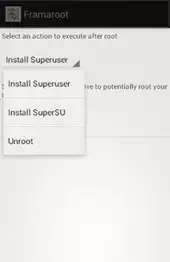
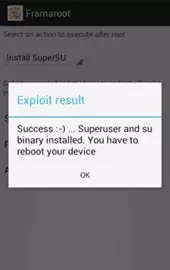
4. As soon as you receive a notification on the screen that the phone has been successfully rooted, restart the device.
Summary: OS: Android 9.0 Pie Go Edition; CPU: Cortex-A53; CPU frequency: 1300.0 MHz (4-core); Chipset: Mediatek MT6762 Helio P22; GPU: PowerVR GE8320; RAM Memory: 2 GB; Display: LCD IPS Color (16M), 720x1520 px (6.8") 247ppi; Touch screen: yes; Built-in memory: 16 GB; Memory card: microSDXC max. 64 GB; Camera: 8.0 MPx; Flash: LED; Autofocus: yes; Optical zoom: yes; Digital zoom: yes; Second camera: 8.0 Mpx; Bluetooth: 5.0; NFC: yes; EDGE: yes; GPRS: yes; GPS: yes; A-GPS: yes; Glonass: yes; LTE: LTE-FDD: 800, 900, 1800, 2100, 2600, LTE-TDD: 2600; GSM: 850 900 1800 1900; HSDPA: 850 900 1900 2100 HSPA; HSUPA speed: 5,76 Mb/s; HSDPA speed: 42 Mb/s; USB: 2.0; WAP: yes; Wi-Fi: 802.11 a/b/g/n/ac; Audio for ...
 | Tarik Tonkov Mobile technology specialist |
| Tarik Tonkov is a computer scientist and programmer turned tech journalist with a keen interest in the world of smartphones and tablets. He previously wrote for Android Life and was also a ghostwriter for several technology and automotive publications. He appreciates the reliability and beauty of smartphones, the symbiosis of characteristics and usability. In his free time, Tarik likes to travel by car and polish his programming skills to create small useful programs. | |
Comments, Questions and Answers about QSmart Rocket Pro
Ask a question about QSmart Rocket Pro
The new REDMI K90 Max flagship smartphone has been unveiled. This is a gaming model designed for high performance and stable operation under heavy load thanks to its active cooling system. Additionally, the device is equipped with a high-refresh-rate display and a high-capacity battery.
Alongside the top-of-the-line OPPO Find X9 Ultra, another model in the flagship series was unveiled: the Find X9s Pro. It is a compact and powerful device with an advanced camera setup featuring Hasselblad tuning and a high-capacity battery.
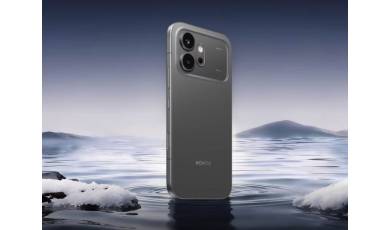
Alongside the Honor 600 Pro, a more affordable base model of the smartphone was also unveiled. It retains many of the features of the higher-end model but differs in several hardware specifications, which have influenced the price of the new device.