


Secret codes for Acer Super ZX
Mobiles >> Acer >> Acer Super ZX| Specifications | Reviews | Secret codes |
| Unlock phone | Root phone |
| Backup | Flash Firmware | Screenshot |
Acer secret codes
*#06# - IMEI (International Mobile Equipment Identity) numberAcer V 750
*#400# Display Adc/ Set Cal-Value -
*#402# Set LCD Contrast
*#403# Display Errors Info
*#300# Display Info Hw & Sw
*#301# Menu Test
*#302# Menu Acoustics
*#303# (Settings saved) Set English language?
*#307# Menu Engineering
*#311# Reset Phone Code - [ Also reset Security Codes ! ]
*#330# (Execute not success) [ unknown ]
*#331# (Service deactivated) [ unknown ]
*#332# (Service unavailable)[ unknown ]
*#333# (Execute not success)[ unknown ]
*#351# (Service unavailable) [ unknown ]
Genie DB
*#2254*# Near Cell Mode.For every received BTS will be displayed :
Current channel and 2 channel levels
*#2558# time of network connection ( D/H/M )
*#2562# Fores reconnection to network !!!
*#7489# Dispalys and modify phones' security code!!! !!!
*#3377# SIM lock information !!!
*#7378# SIM card Informations : supported phase name and tipe
*#7693# Enable/disable "Sleep Mode"
*#8463# State of "Sleep Mode"
*#2255# Debug Call Mode enable/disable
*#3333*# Displays the blocking list.
*#7489*# Displays the security code
*#06# Displays the IMEI number
*#8377*# Displays the SW info.
ANDROID Acer secret codes for Acer Super ZX
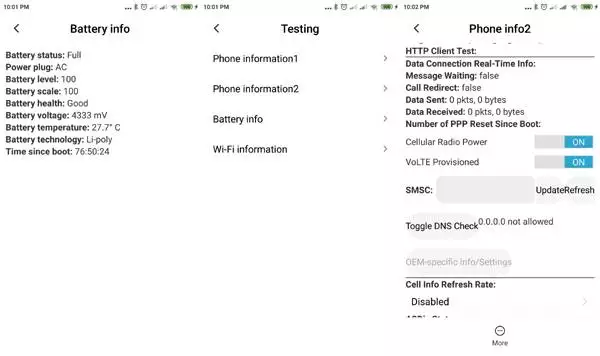
*#*#4636#*#* - Testing menu only have Phone Information, Usage Statistics and Wi-Fi information. 4 menus will appear on the phone screen: (Phone information, Battery information, Battery history, Usage statistics)
*#*#225#*#* - Shows you everything that is saved on your Calendar such as Events, Holidays, Trips, Birthdays, Anniversary
*#*#426#*#* - Google Play Services app with the information about the connectivity with the FCM server
*#*#759#*#* - RLz Debug UI system hidden menu
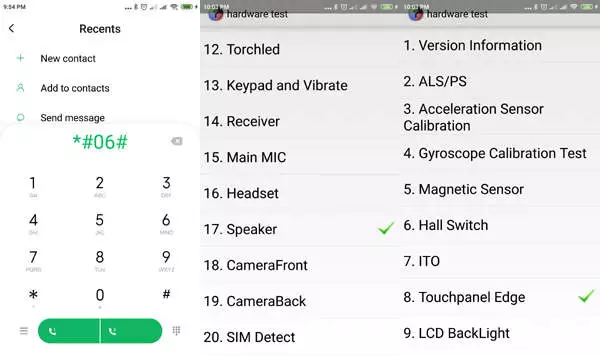
*#*#36245#*#* - Access Email debug info
*#*#8255#*#* - Access GTalk Service Monitor
*#*#64663#*#* - Open engineering mode (Version, Bluetooth, Battery, Speakers)
*#2886# - Factory Auto Testing
*#*#273282*255*663282*#*#* OR *#*#273283*255*663282*#*#* - To copy and backup media files
*#*#7780#*#* - Return to factory setting for hard reset but remove applications only. It'll remove following things: (Downloaded applications, Google account, all data and settings)
*2767*3855# - This code is used for factory format.
*#*#7594#*#* - Tailor the function of the "End Call / Power" button on your phone to your preference.
*#*#34971539#*#* - This code is to retrieve information about the phone camera.
*#*#97#*#* - Language and Keyboard settings in Acer Super ZX
*#872564# - USB logging control
*#301279# - This code is Shows HSDPA/HSUPA Control Menu
*#9900# - System dump mode Acer Super ZX
*#*#46*#*# - Reset Sim in Acer Super ZX
*#*#197328640#*#* - Enter service mode to run various tests and change settings
WLAN, GPS and Bluetooth Test Codes:
*#*#232339#*#* OR *#*#526#*#* OR *#*#528#*#* - WLAN test (Use "Menu" button to start various tests)
*#*#232338#*#* - Display of the Wi-Fi Mac address on your phone.
*#*#1472365#*#* - Device GPS test
*#*#1575#*#* - For a more advanced GPS test
*#*#232331#*#* - Device Bluetooth test
*#*#232337#*# - Shows Bluetooth device address in Acer Super ZX
GSM codes for Acer Super ZX
Change PIN code - **04* and enter the old PIN code, and twice a new PIN code.
Change PIN2 code - **042* and enter the old PIN2 code, and twice the new PIN2 code.
Unlock SIM (PIN) - **05* and enter the PUK code and new PIN code twice
Unlock SIM (PIN2) - **052* and enter the PUK2 code and new PIN2 code twice
Call Forwarding (you have to order the service from the operator)
| ##002# | Deactivate all call diverts |
| ##004# | Cancel all conditional call forwarding |
| **004* phone number # | Activate all conditional call forwarding |
Unconditional call forwarding (Call Forward All)
| ###21 | Switch off and deactivate |
| #21# | Deactivate |
| **21*phone number# | Enable and Activate |
| *21# | Activate |
| *#21# | Check the condition |
Diversion in case of "no answer"
| ###61 | Switch off and deactivate |
| #61# | Deactivate |
| **61* phone number# | Enable and Activate |
| *61# | Activate |
| *#61# | Check the condition |
Diversion in case of "not available"
| ### 62 | Switch off and deactivate |
| # 62 # | Deactivate |
| ** 62 *phone number# | Enable and Activate |
| * 62 # | Activate |
| * # 62 # | Check the condition |
Diversion in case of "busy"
| ###67 | Switch off and deactivate |
| #67# | Deactivate |
| **67*phone number# | Enable and Activate |
| *67# | Activate |
| *#67# | Check the condition |
Call Barring (you have to order the service from the operator)
Change the password for all bans (default - 0000)
- ** 03 * 330 * old password * new password * new password #
Restrict of all outgoing calls
**33*(enter password)#@ - To Activate
#33*(enter password)#@ - To Cancel
*#33#@ - Check Status
Restrict of all calls
*330*(enter password)# - To Activate
#330*(enter password)# - To Cancel
*#330# - Check Status
Block outgoing international calls
*331*(enter password)# - To Activate
#331*(enter password)# - To Cancel
*#331# - Check Status
Restrict of all outgoing international calls when roaming
*332*(enter password)# - To Activate
#332*(enter password)# - To Cancel
*#332# - Check Status
Barring of all outgoing calls on your phone
*333*(enter password)# - To Activate
#333*(enter password)# - To Cancel
*#333# - Check Status
Restrict of all incoming calls
*353*(enter password)# - To Activate
#353*(enter password)# - To Cancel
*#353# - Check Status
Restrict all incoming calls when roaming
*351*(enter password)# - To Activate
#351*(enter password)# - To Cancel
*#351# - Check Status
Call waiting (you have to order the service from the operator)
*43# - To Activate
#43# - To Cancel
*#43# - Check Status
Transfer your phone number (Anti ANI)
#30#phone number - Block
*30#phone number - Allow
*#30# - Check Status
Show phone number of the caller you (ANI)
#77# - Block
*77# - Allow
*#77# - Check Status
Proceed with Caution: Use codes with care, as incorrect usage could affect device functionality.
If you're unsure about a code, do not use it. It's better to be safe than sorry.
 | Tarik Tonkov Mobile technology specialist |
| Tarik Tonkov is a computer scientist and programmer turned tech journalist with a keen interest in the world of smartphones and tablets. He previously wrote for Android Life and was also a ghostwriter for several technology and automotive publications. He appreciates the reliability and beauty of smartphones, the symbiosis of characteristics and usability. In his free time, Tarik likes to travel by car and polish his programming skills to create small useful programs. | |
Comments, Questions and Answers about the secret codes of Acer Super ZX
Ask a question about Acer Super ZX