

Bypass FRP Samsung Galaxy S25 Edge
Mobiles >> Samsung >> Samsung Galaxy S25 Edge| Specifications | Reviews | Secret codes |
| Unlock phone | Root phone | Bypass FRP |
| Backup | Flash Firmware | Screenshot |
How to Bypass FRP Samsung Galaxy S25 Edge using Easy Samsung FRP Tool 2020 v1
Before Bypass FRP, follow these steps.
1. Charge your phone battery.
2. Make sure you know the exact model of your phone.
3. Take a USB cable to connect a mobile phone to the PC.
4. Download Easy Samsung FRP Tool 2020 v1 on your PC.
5. Next, download and install Samsung USB driver v1.7.43.0 on your PC.
Bypass FRP using Easy Samsung FRP Tool 2020 v1
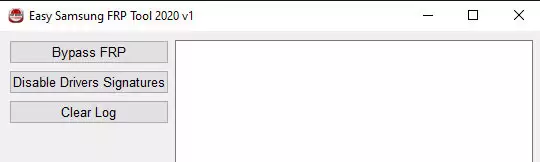
1. Open the Easy Samsung FRP Tool on your computer.
2. Then Press the Disable Driver Signature.
3. Restart Your Computer. Open Easy Samsung FRP Tool on your PC again.
4. Connect Samsung to the PC using a USB cable.
5. Next click the Bypass FRP button in the Easy Samsung FRP Tool window.
6. Check your phone, a pop-up window appears on its screen, press the View button.
Summary: Card slot: No; Internal: 256GB 12GB RAM, 512GB 12GB RAM; OS: Android 15, up to 7 major Android upgrades, One UI 7; Chipset: Qualcomm SM8750-AC Snapdragon 8 Elite (3 nm); CPU: Octa-core (2x4.47 GHz Oryon V2 Phoenix L + 6x3.53 GHz Oryon V2 Phoenix M); GPU: Adreno 830 (1200 MHz); Dual: 200 MP, f/1.7, 24mm (wide), 1/1.3", 0.6µm, multi-directional PDAF, OIS 12 MP, f/2.2, 13mm (ultrawide), 1/2.55", 1.4µm, PDAF; Features: Best Face, LED flash, HDR, panorama; Video: 8K@30fps, 4K@30/60/120fps, 1080p@30/60/120/240fps, 10-bit HDR; Single camera: 12 MP, f/2.2, 26mm (wide), 1/3.2", 1.12µm, dual pixel PDAF; Video: 4K@30/60fps, 1080p@30/60fps; Loudspeaker: Yes, with stereo speakers; 3.5mm jack: No; WLAN: Wi-Fi 802.11 a/b/g/n/ac/6/7, tri-band, Wi-Fi Direct; Bluetooth: 5.4, A2DP, LE; Positioning: GPS, ...
Comments, questions and answers on the Bypass FRP on Samsung Galaxy S25 Edge
Ask a question about Samsung Galaxy S25 Edge
