



Secret codes for Koolnee K1 Trio
Mobiles >> KOOLNEE >> Koolnee K1 Trio| Specifications | Reviews | Secret codes |
| Unlock phone | Root phone |
| Backup | Flash Firmware | Screenshot |
| Hard Reset |
KOOLNEE secret codes
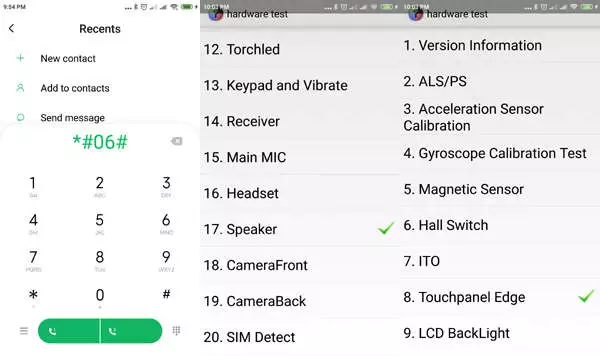
*#06# - IMEI (International Mobile Equipment Identity) numberANDROID KOOLNEE secret codes for Koolnee K1 Trio
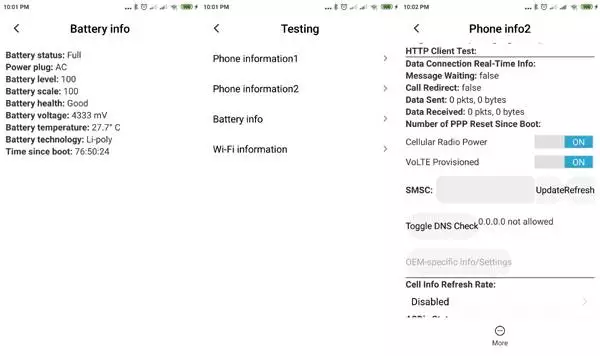
*#*#4636#*#* - Hidden Android Testing menu Koolnee K1 Trio. 4 menus will appear on the phone screen: (Phone information, Battery information, Battery history, Usage statistics)
*#*#225#*#* - Upcoming calendar events
*#*#426#*#* - Google Play Services app with the information about the connectivity with the FCM server
*#*#759#*#* - Rlz Debug UI. Unique Device ID, PID, ACAP other data related to application installation.
*#*#36245#*#* - Access Email debug info Email
*#*#8255#*#* - Used to launch G Talk Service Monitor
*#*#64663#*#* - Hardware Test (Version, screen, led, sound, vibrate, all sensors)
*#2886# - Factory Auto Testing
*#*#273282*255*663282*#*#* OR *#*#273283*255*663282*#*#* - To copy and backup media files
*#*#7780#*#* - Return to factory setting. It'll remove following things: (Downloaded applications, Google account, all data and settings)
*2767*3855# - This code is used for factory format.
*#*#7594#*#* - Modify the response of the "End Call / Power" button on your phone.
*#*#34971539#*#* - Checking your mobile phone's camera details.
*#*#97#*#* - Language and Keyboard settings in Koolnee K1 Trio
*#872564# - USB logging control
*#301279# - Use this code to access the HSDPA/HDUPA control panel
*#9900# - System dump mode Koolnee K1 Trio
*#*#46*#*# - Reset Sim in Koolnee K1 Trio
*#*#197328640#*#* - Enter service mode to run various tests and change settings
WLAN, GPS and Bluetooth Test Codes:
*#*#232339#*#* OR *#*#526#*#* OR *#*#528#*#* - WLAN test (Use "Menu" button to start various tests)
*#*#232338#*#* - Displays Wi-Fi Mac-address
*#*#1472365#*#* - Run GPS test
*#*#1575#*#* - For a more advanced GPS test
*#*#232331#*#* - Show Bluetooth Test Mode
*#*#232337#*# - Shows Bluetooth device address in Koolnee K1 Trio
GSM codes for Koolnee K1 Trio
Change PIN code - **04* and enter the old PIN code, and twice a new PIN code.
Change PIN2 code - **042* and enter the old PIN2 code, and twice the new PIN2 code.
Unlock SIM (PIN) - **05* and enter the PUK code and new PIN code twice
Unlock SIM (PIN2) - **052* and enter the PUK2 code and new PIN2 code twice
Call Forwarding (you have to order the service from the operator)
| ##002# | Disables all call forwarding |
| ##004# | Cancel all conditional call forwarding |
| **004* phone number # | Activate all conditional call forwarding |
Unconditional call forwarding (Call Forward All)
| ###21 | Switch off and deactivate |
| #21# | Deactivate |
| **21*phone number# | Enable and Activate |
| *21# | Activate |
| *#21# | Check the condition |
Diversion in case of "no answer"
| ###61 | Switch off and deactivate |
| #61# | Deactivate |
| **61* phone number# | Enable and Activate |
| *61# | Activate |
| *#61# | Check the condition |
Diversion in case of "not available"
| ### 62 | Switch off and deactivate |
| # 62 # | Deactivate |
| ** 62 *phone number# | Enable and Activate |
| * 62 # | Activate |
| * # 62 # | Check the condition |
Diversion in case of "busy"
| ###67 | Switch off and deactivate |
| #67# | Deactivate |
| **67*phone number# | Enable and Activate |
| *67# | Activate |
| *#67# | Check the condition |
Call Barring (you have to order the service from the operator)
Change the password for all bans (default - 0000)
- ** 03 * 330 * old password * new password * new password #
Barring of all outgoing calls on your phone
**33*(enter password)#@ - Enter to activate
#33*(enter password)#@ - Enter to deactivate
*#33#@ - Check
Block all calls on your phone
*330*(enter password)# - Enter to activate
#330*(enter password)# - Enter to deactivate
*#330# - Check
Block outgoing international calls
*331*(enter password)# - Enter to activate
#331*(enter password)# - Enter to deactivate
*#331# - Check
How to block all outgoing international calls when roaming
*332*(enter password)# - Enter to activate
#332*(enter password)# - Enter to deactivate
*#332# - Check
Restrict of all outgoing calls
*333*(enter password)# - Enter to activate
#333*(enter password)# - Enter to deactivate
*#333# - Check
Barring of all incoming calls on your phone
*353*(enter password)# - Enter to activate
#353*(enter password)# - Enter to deactivate
*#353# - Check
Block all incoming calls on your phone when roaming
*351*(enter password)# - Enter to activate
#351*(enter password)# - Enter to deactivate
*#351# - Check
Call waiting (you have to order the service from the operator)
*43# - Enter to activate
#43# - Enter to deactivate
*#43# - Check
Transfer your phone number (Anti ANI)
#30#phone number - Block
*30#phone number - Allow
*#30# - Check
Show phone number of the caller you (ANI)
#77# - Block
*77# - Allow
*#77# - Check
Proceed with Caution: Use codes with care, as incorrect usage could affect device functionality.
If you're unsure about a code, do not use it. It's better to be safe than sorry.
 | Tarik Tonkov Mobile technology specialist |
| Tarik Tonkov is a computer scientist and programmer turned tech journalist with a keen interest in the world of smartphones and tablets. He previously wrote for Android Life and was also a ghostwriter for several technology and automotive publications. He appreciates the reliability and beauty of smartphones, the symbiosis of characteristics and usability. In his free time, Tarik likes to travel by car and polish his programming skills to create small useful programs. | |
Comments, Questions and Answers about the secret codes of Koolnee K1 Trio
Ask a question about Koolnee K1 Trio


The new RedMagic 12 Pro+ gaming smartphone was unveiled in China. The company promises outstanding performance thanks to its flagship Snapdragon chip, smooth graphics on its notch-less 185Hz display, and efficient cooling.

Reputable insider OnLeaks revealed the upcoming redesign of Samsung's flagship and even published high-quality CAD renders of the device. The main difference from previous models in the series is expected to be a completely new camera module.

REDMI has unveiled its new REDMI 17C 5G smartphone. This affordable model is ideal for basic everyday tasks. Despite its price tag, it boasts decent battery life and a display with smooth animations.