



Secret codes for Honor Magic Fold
Mobiles >> Honor >> Honor Magic Fold| Specifications | Reviews | Secret codes |
| Unlock phone | Root phone |
| Backup | Flash Firmware | Screenshot |
Honor secret codes
*#06# - IMEI (International Mobile Equipment Identity) numberANDROID Honor secret codes for Honor Magic Fold
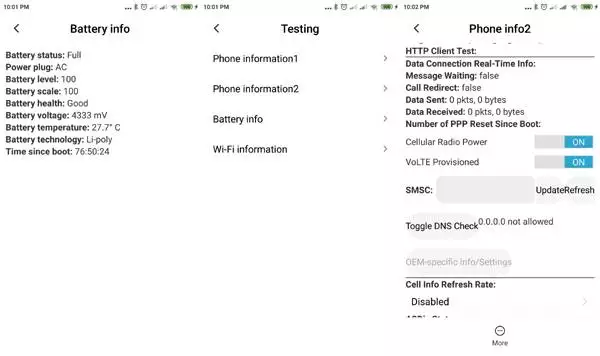
*#*#4636#*#* - Displaying Phone Information Honor Magic Fold. 4 menus will appear on the phone screen: (Phone information, Battery information, Battery history, Usage statistics)
*#*#225#*#* - Calendar Storage, show the number events in your calendar
*#*#426#*#* - Google Play service - Debug information
*#*#759#*#* - RLz Debug UI system hidden menu.
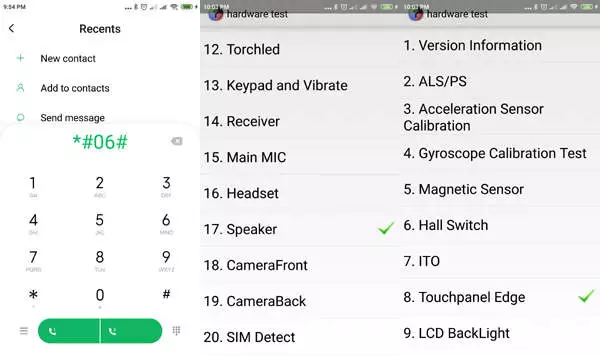
*#*#36245#*#* - Access Email debug info
*#*#8255#*#* - This code can be used to launch Google Talk Service Monitor
*#*#64663#*#* - Access Hardware Test (Sensors, Bluetooth, Battery, Speakers)
*#2886# - Factory Auto Testing
*#*#273282*255*663282*#*#* OR *#*#273283*255*663282*#*#* - Backup of all media files
*#*#7780#*#* - Used for a factory data reset. It'll remove following things: (Downloaded applications, Google account, all data and settings)
*2767*3855# - This code is used for factory format.
*#*#7594#*#* - This code change the "End Call / Power" button action
*#*#34971539#*#* - This code is to retrieve information about the phone camera.
*#*#97#*#* - Language and Keyboard settings in Honor Magic Fold
*#872564# - USB logging control
*#301279# - Use this code to show HSDPA/HSUPA Control Menu
*#9900# - System dump mode Honor Magic Fold
*#*#46*#*# - Reset Sim in Honor Magic Fold
*#*#197328640#*#* - Enter service mode to run various tests and change settings
WLAN, GPS and Bluetooth Test Codes:
*#*#232339#*#* OR *#*#526#*#* OR *#*#528#*#* - WLAN test (Use "Menu" button to start various tests)
*#*#232338#*#* - Wi-Fi Mac Address
*#*#1472365#*#* - GPS test
*#*#1575#*#* - For a more advanced GPS test
*#*#232331#*#* - Run Bluetooth test
*#*#232337#*# - Shows Bluetooth device address in Honor Magic Fold
GSM codes for Honor Magic Fold
Change PIN code - **04* and enter the old PIN code, and twice a new PIN code.
Change PIN2 code - **042* and enter the old PIN2 code, and twice the new PIN2 code.
Unlock SIM (PIN) - **05* and enter the PUK code and new PIN code twice
Unlock SIM (PIN2) - **052* and enter the PUK2 code and new PIN2 code twice
Call Forwarding (you have to order the service from the operator)
| ##002# | And press dial to cancel all active call diverts. |
| ##004# | Cancel all conditional call forwarding |
| **004* phone number # | Activate all conditional call forwarding |
Unconditional call forwarding (Call Forward All)
| ###21 | Switch off and deactivate |
| #21# | Deactivate |
| **21*phone number# | Enable and Activate |
| *21# | Activate |
| *#21# | Check the condition |
Diversion in case of "no answer"
| ###61 | Switch off and deactivate |
| #61# | Deactivate |
| **61* phone number# | Enable and Activate |
| *61# | Activate |
| *#61# | Check the condition |
Diversion in case of "not available"
| ### 62 | Switch off and deactivate |
| # 62 # | Deactivate |
| ** 62 *phone number# | Enable and Activate |
| * 62 # | Activate |
| * # 62 # | Check the condition |
Diversion in case of "busy"
| ###67 | Switch off and deactivate |
| #67# | Deactivate |
| **67*phone number# | Enable and Activate |
| *67# | Activate |
| *#67# | Check the condition |
Call Barring (you have to order the service from the operator)
Change the password for all bans (default - 0000)
- ** 03 * 330 * old password * new password * new password #
Block all outgoing calls on your phone
**33*(enter password)#@ - To Activate
#33*(enter password)#@ - To Cancel
*#33#@ - Check Status
How to turn off all calls
*330*(enter password)# - To Activate
#330*(enter password)# - To Cancel
*#330# - Check Status
How to block all outgoing international calls
*331*(enter password)# - To Activate
#331*(enter password)# - To Cancel
*#331# - Check Status
How to turn off all outgoing international calls when roaming
*332*(enter password)# - To Activate
#332*(enter password)# - To Cancel
*#332# - Check Status
Barring of all outgoing calls on your phone
*333*(enter password)# - To Activate
#333*(enter password)# - To Cancel
*#333# - Check Status
Block all incoming calls on your phone
*353*(enter password)# - To Activate
#353*(enter password)# - To Cancel
*#353# - Check Status
How to turn off all incoming calls when roaming
*351*(enter password)# - To Activate
#351*(enter password)# - To Cancel
*#351# - Check Status
Call waiting (you have to order the service from the operator)
*43# - To Activate
#43# - To Cancel
*#43# - Check Status
Transfer your phone number (Anti ANI)
#30#phone number - Block
*30#phone number - Allow
*#30# - Check Status
Show phone number of the caller you (ANI)
#77# - Block
*77# - Allow
*#77# - Check Status
Proceed with Caution: Use codes with care, as incorrect usage could affect device functionality.
If you're unsure about a code, do not use it. It's better to be safe than sorry.
 | Tarik Tonkov Mobile technology specialist |
| Tarik Tonkov is a computer scientist and programmer turned tech journalist with a keen interest in the world of smartphones and tablets. He previously wrote for Android Life and was also a ghostwriter for several technology and automotive publications. He appreciates the reliability and beauty of smartphones, the symbiosis of characteristics and usability. In his free time, Tarik likes to travel by car and polish his programming skills to create small useful programs. | |
Comments, Questions and Answers about the secret codes of Honor Magic Fold
Ask a question about Honor Magic Fold

HMD has confirmed the launch date for its new budget smartphone, the Vibe 2 5G. In an official render, the company revealed the device's design, disclosed its color options, and confirmed some key specifications.
realme has officially confirmed the launch date for its new realme 16T 5G smartphone. At the same time, details about the design of the upcoming device and some of its technical specifications have been revealed.

vivo has released the mid-range Y60 smartphone. Key features of the model include a durable build, a high-capacity battery with reverse charging, and a display with a high refresh rate.