
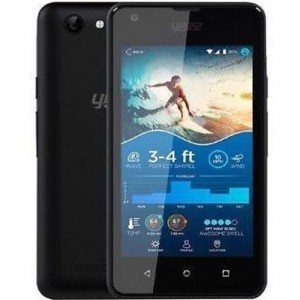
Unlock Yezz Andy 4e5 8gb
Mobiles >> Yezz >> Yezz Andy 4e5 8gb| Specifications | Reviews | Secret codes |
| Unlock phone | Root phone |
| Backup | Flash Firmware | Screenshot |
How to unlock Yezz Andy 4e5 8gb?
1. Unlock Yezz Andy 4e5 8gb, locked by the operator.2. Unlock Yezz Andy 4e5 8gb, depending on the manufacturer.
3. Conduct unlock SIM card.
4. Restore the phone capacity, which has been locked memory.
5. Unlock java games
6. Remove the graphic lock, password from the smartphone
How to unlock the phone, locked the operator?
This type of blocking excludes the use of the phone in the network of another operator. A phone with a SIM card of another operator, immediately upon switching on, will ask you to enter a password or unlock code.
To unlock the phone, you need to contact the operator or use the services of sites that will give you an unlock code for money to change the operator.
Unlock your phone, depending on the manufacturer.
On some phones, you can lock the screen using a password that you set yourself. But what if you forgot this password? To unlock your phone, you need to do a factory reset on your phone.
Unlocking phone SIM card
A small plastic card with a chip in the middle - it's indispensable device without which the mobile phone is simply useless as such. It is, of course, on the SIM card. The chip, which it applies, although the small size, but allows you to keep a certain amount of information, which is often confidential. For the safety of the data is also used to protect the technology with the help of the so-called PIN-code that is requested to be turned off. If you unsuccessfully enter the PIN three times, the mobile device will prompt you for a different code, the so-called PUK-code is. It usually consists of eight digits and is provided to you together with the SIM card. If you can not use the phone because of the ignorance of the PIN-code, just use the PUK-code. The PUK code can be found in the documents for the SIM card, if they are lost, then the first thing to do is call the mobile operator. Or contact your nearest customer service center with your SIM card and phone. There you will be prompted with the PUK code.
Unlock your phone memory
Some phone models allow you to set a password to access the phone memory or memory card. If you have forgotten the password to access the memory, you need to use special software such as the JetFlash Recovery Tool. You can download it from the official website of the developers.
You must be aware of your actions and perfectly understand what you are doing. Otherwise, you can simply break the phone, and you cannot recover it. Therefore, if you do not know how to unlock your phone, you do not need to perform any actions with it, it is best to seek professional help. But I still hope that you will not face similar problems and will handle your phone wisely.
Unlock java games
For games that are preinstalled on your phone from the factory and are only trial versions, you need to buy a code that unlocks all game functions without having to reinstall the game.
If you would like to buy the game, follow the instructions on the screen. Connect your phone to the Internet and get ready to pay with your credit card.
How to remove the graphic lock, password from the smartphone?
If you have forgotten your pattern or password, then you have several ways to unlock your smartphone.
The first way. After a series of unsuccessful attempts to enter a pattern, the phone will prompt you to enter the login and password of the Google account with which the smartphone was activated.
The second way. If you do not know the login and password for the Google account, you will have to make a hard reset. But keep in mind that you will lose all information stored on your phone.
For android phones, the hard reset procedure is almost the same, there are only small differences, a detailed description for each specific model you can find on our website. Here we will tell the general list of actions.
-Turn off your phone.
-Press the Power and Volume Up buttons simultaneously for a few seconds.
-The phone will then boot into «Recovery mode».
-Use the volume buttons to navigate through the menus and press the Power button to make a selection.
-Select «Wipe data / factory reset» from the menu.
-Select «Reboot system now» from the menu.
-After restarting your phone, you can use it.
The third way. Unlock your smartphone using the unlock service from the smartphone manufacturer. For example, Samsung offers «Find My Mobile» to track and manage mobile phone access.
The fourth way. You need to sign in to your Google account on your computer and delete your password there. Your Google account on your computer has a remote reset function that will erase all data, including the lock password. Find My Device and Location must be active on your phone. Of course, a Google account and 'Play Market' must be configured on the smartphone.
Summary: OS: Android 7.0 Nougat; CPU: ARM Cortex-A7; CPU frequency: 1300.0 MHz (4-core); Chipset: MediaTek MT6580M; GPU: ARM Mali-400 MP2; GPU frequency: 416.0 MHz (2-core); RAM Memory: 1 GB; Display: TFT Color (16M), 480x800 px (4.0") 233ppi; Touch screen: yes; Built-in memory: 8 GB; Memory card: microSDXC; Camera: 5.04 MPx; Resolution: 2592 x 1944 px; Flash: LED; Autofocus: no; Optical zoom: no; Digital zoom: yes; Second camera: 1.92 Mpx; Resolution: 1600 x 1200 px; Bluetooth: 4.0; EDGE: yes; GPRS: yes; GPS: yes; A-GPS: yes; GSM: 850 900 1800 1900; HSDPA: 850 900 1900 2100 HSPA; HSUPA speed: 5,76 Mb/s; HSDPA speed: 21 Mb/s; USB: 2.0; WAP: 2.0; Wi-Fi: 802.11 b/g/n; Audio formats: AAC, AAC , MIDI, M ...
 | Tarik Tonkov Mobile technology specialist |
| Tarik Tonkov is a computer scientist and programmer turned tech journalist with a keen interest in the world of smartphones and tablets. He previously wrote for Android Life and was also a ghostwriter for several technology and automotive publications. He appreciates the reliability and beauty of smartphones, the symbiosis of characteristics and usability. In his free time, Tarik likes to travel by car and polish his programming skills to create small useful programs. | |
Comments, Questions and Answers about Yezz Andy 4e5 8gb
Ask a question about Yezz Andy 4e5 8gb
HMD has confirmed the launch date for its new budget smartphone, the Vibe 2 5G. In an official render, the company revealed the device's design, disclosed its color options, and confirmed some key specifications.
realme has officially confirmed the launch date for its new realme 16T 5G smartphone. At the same time, details about the design of the upcoming device and some of its technical specifications have been revealed.
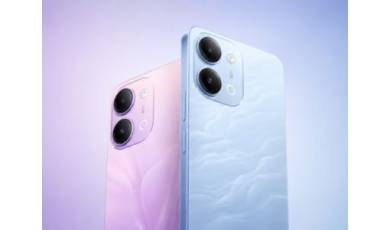
vivo has released the mid-range Y60 smartphone. Key features of the model include a durable build, a high-capacity battery with reverse charging, and a display with a high refresh rate.