
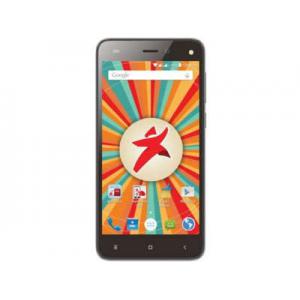
Unlock Starmobile PLAY Max
Mobiles >> Starmobile >> Starmobile PLAY Max| Specifications | Reviews | Secret codes |
| Unlock phone | Root phone |
| Backup | Flash Firmware | Screenshot |
How to unlock Starmobile PLAY Max?
1. Unlock Starmobile PLAY Max, locked by the operator.2. Unlock Starmobile PLAY Max, depending on the manufacturer.
3. Conduct unlock SIM card.
4. Restore the phone capacity, which has been locked memory.
5. Unlock java games
6. Remove the graphic lock, password from the smartphone
How to unlock the phone, locked the operator?
This type of blocking is used to make it impossible to use the phone in the network of another operator. When you turn on the phone with a SIM card from another operator, you will be asked to enter a password or unlock code.
To unlock your phone, you need to use the services of sites that, for little money, will give you an unlock code to change the operator or network.
Unlock your phone, depending on the manufacturer.
On some phones, you can lock the screen using a password that you set yourself. To unlock your phone with this password, if you've forgotten it, you need to reset your phone to factory settings.
Unlocking phone SIM card
A small plastic card with a chip in the middle - it's indispensable device without which the mobile phone is simply useless as such. It is, of course, on the SIM card. The chip, which it applies, although the small size, but allows you to keep a certain amount of information, which is often confidential. For the safety of the data is also used to protect the technology with the help of the so-called PIN-code that is requested to be turned off. If you unsuccessfully enter the PIN three times, the mobile device will prompt you for a different code, the so-called PUK-code is. It usually consists of eight digits and is provided to you together with the SIM card. If you can not use the phone because of the ignorance of the PIN-code, just use the PUK-code. The PUK code can be found in the documents for the SIM card, if they are lost, then you can either call the mobile operator, or contact the nearest customer service center, taking the SIM card and phone with you. You will be prompted with the PUK code.
Unlock your phone memory
Some phone models allow you to separately deny access to the phone memory or memory card. If you have forgotten the password to access the memory, you need to use additional software. You will need a cable to connect your phone to your computer. One of the programs with which you can access memory is the JetFlash Recovery Tool. You can download it from the official website of the developers.
You must be aware of your actions and understand that you can simply break the phone and you cannot restore it. Therefore, if you do not know how to unlock your phone memory, it is best to seek professional help.
Unlock java games
To fully play the games that are preinstalled on your phone, you need to buy a special code to unlock all their functions.
To buy the game you need to follow the instructions after choosing to buy the game, you will need an Internet connection and the ability to pay by credit card.
How to remove the graphic lock, password from the smartphone?
If you have locked your smartphone and forgot the pattern, then you should not be upset. You have several ways to unlock your smartphone.
The first way. Enter the pattern until the system prompts you to enter the login and password from the Google account with which the smartphone was activated.
The second way. If you do not know the login and password for the Google account, you need to reset your phone to factory settings by doing a hard reset operation. You will then lose all photos and media stored on your phone.
For android phones, the hard reset procedure is almost the same, there are only small differences, a detailed description for each specific model you can find on our website. Here we will tell the general list of actions.
-Turn off your smartphone.
-Press the Power and Volume Up buttons simultaneously for 10 seconds.
-«Recovery mode» will appear on the screen.
-Use the volume buttons to navigate the menu, and use the Power button to select.
-Select «Wipe data / factory reset» from the menu.
-Then select «Reboot system now» from the Recovery mode menu.
-After reboot, you will receive the phone as if it were from the factory.
The third way. Unlock your smartphone using a special service from the smartphone manufacturer. For example, Samsung has developed its own «Find My Mobile» service to track and manage mobile phone access.
The fourth way. Remove your password using your Google account if you can connect to it on your computer. Your Google account on your computer has a function to delete data on your phone and remote reset, which will erase all data, including the lock password. Find My Device and Location must be active on your phone. It is necessary that a Google account and 'Play Market' must be configured on the smartphone.
Summary: Type: Smartphone; Smart Phone OS: Android; OS ver: Android 6.0 Marshmallow; SIM: Micro SIM, Dual SIM, Dual Standby; CPU: Quad Core ARM Cortex-A7, Spreadtrum 7731G Chipset; Processor Speed: 1.3 GHz; Storage: 8GB; RAM: 1GB; External Storage: 32GB Micro SD Max Expansion; Battery: 4000mAh Li-Ion, Up to 22 hours talk time,Up to 400 hours (16.6 days) standby time; Screen Size: 5 inches; Resolution: HD (720 x 1280); Main Camera: 8 MP AF with Flash; Front Camera: 5 MP FF with Flash; Features: WiFi, GPS, Bluetooth, Flash; Dimensions: 143.9 x 71.5 x 9.9 mm; Weight: 159 g; ...
 | Tarik Tonkov Mobile technology specialist |
| Tarik Tonkov is a computer scientist and programmer turned tech journalist with a keen interest in the world of smartphones and tablets. He previously wrote for Android Life and was also a ghostwriter for several technology and automotive publications. He appreciates the reliability and beauty of smartphones, the symbiosis of characteristics and usability. In his free time, Tarik likes to travel by car and polish his programming skills to create small useful programs. | |
Comments, Questions and Answers about Starmobile PLAY Max
| Android guru | August 21, 2017 | |
| In Android there are several settings that may not allow you to remove the screen lock. In addition to the settings, the installed applications can interfere with unblocking. 1. Remove the VPN, 2. Disable administrator rights, 3. Remove the third-party security certificates, 4. Try to disable the lock in safe mode. Do not allow to remove the lock can be downloaded application, which downloaded from the Play Store. To find out if there is such an application in the devices memory, load it into safe mode. In this mode, all downloaded applications are disabled, only those installed at the factory are working. If the lock is removed, then it means that some downloaded application is guilty. | ||
Ask a question about Starmobile PLAY Max
The new REDMI K90 Max flagship smartphone has been unveiled. This is a gaming model designed for high performance and stable operation under heavy load thanks to its active cooling system. Additionally, the device is equipped with a high-refresh-rate display and a high-capacity battery.
Alongside the top-of-the-line OPPO Find X9 Ultra, another model in the flagship series was unveiled: the Find X9s Pro. It is a compact and powerful device with an advanced camera setup featuring Hasselblad tuning and a high-capacity battery.
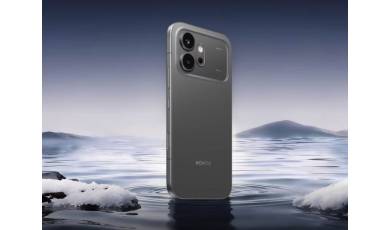
Alongside the Honor 600 Pro, a more affordable base model of the smartphone was also unveiled. It retains many of the features of the higher-end model but differs in several hardware specifications, which have influenced the price of the new device.