
How to root Notion Ink Adam LCD, WiFi and 3G.
Mobiles >> Notion Ink >> Notion Ink Adam LCD, WiFi and 3G| Specifications | Reviews | Secret codes |
| Unlock phone | Root phone |
| Backup | Flash Firmware | Screenshot |
How to root Notion Ink Adam LCD, WiFi and 3G?
There is a lack of functionality on your Android smartphone Notion Ink Adam LCD, WiFi and 3G? You want to get root access on this smartphone?What is Root Android?
Root, or as it is also called the superuser, is needed to extend the functionality of the Android operating system.
In particular, on Unix and Android OS, users who perform actions (watching video, listening to audio, editing documents), work with the rights of guests, then they cannot edit or change / delete / modify system files, increase functionality. In the system, only the main administrator or as he is called the superuser (root) has this function.
What features does Root have on Android:
- Install third-party firmware, and custom ROMs.
- Remove unwanted advertising from applications.
- Remove apps and ringtones installed from the factory.
- Ability to modify system files: Recovery image, Bootloader.
- Increase the battery life.
- Increase the performance of android applications.
- Use a memory card to install applications.
What are the dangers of getting root access?
- A rooted phone cannot be repaired under the lost warranty.
- You will lose the ability to update the software on your phone.
- Your phone may break during this operation.
There are several universal tools that automate the root process and make them available to even the most novice users. One of the most famous is "Framaroot". This program allows you to root a very large number of different devices. And even if the name of your gadget is not listed in the list of supported ones, it still makes sense to try, because the probability of getting root is quite high.
Please charge and restart your phone before starting the operation.
To get root through the "Framaroot" program, follow these steps.
1. You need to download and install the latest version of the 'Framaroot' app on your phone.
2. Run the program. If your phone can be rooted, you will see a drop-down list of possible actions.
3. Choose one of the two options and wait for the message on the screen about the rooting result. If one method doesn't work, choose another..
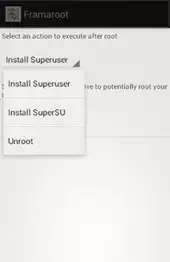
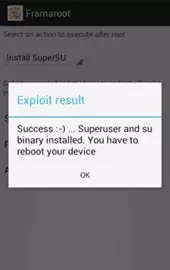
4. As soon as you receive a notification on the screen that the phone has been successfully rooted, restart the device.
Summary: Also Known As: Notion Ink Adam NI3421-A01A9; Operating System: Android v2.2 (Froyo); SIM Slot(s): Single SIM, GSM; Network: 3G: Available, 2G: Available; Dimensions: 191 (H) x 269 (W) x 22 (T) mm; Weight: 765 grams; Colours: Black; Screen Size: 10.1 inches; Screen Resolution: 1024 x 600 pixels; Pixel Density: 118 ppi; Display Type: LCD; Touch Screen: Capacitive Touchscreen; Chipset: Nvidia Tegra 2; Processor: Dual core, 1 GHz, Cortext A9; RAM: 1 GB; Internal Memory: 1 GB; Expandable Memory: Up to 64 GB; Resolution: 3.2 MP; Flash: Yes; Shooting Modes: Continuos Shooting; Camera Features: Digital Zoom, Smile detection; Video Recording: 1920x1080 @ 30 ...
 | Tarik Tonkov Mobile technology specialist |
| Tarik Tonkov is a computer scientist and programmer turned tech journalist with a keen interest in the world of smartphones and tablets. He previously wrote for Android Life and was also a ghostwriter for several technology and automotive publications. He appreciates the reliability and beauty of smartphones, the symbiosis of characteristics and usability. In his free time, Tarik likes to travel by car and polish his programming skills to create small useful programs. | |
Comments, Questions and Answers about Notion Ink Adam LCD, WiFi and 3G
Ask a question about Notion Ink Adam LCD, WiFi and 3G
HMD has confirmed the launch date for its new budget smartphone, the Vibe 2 5G. In an official render, the company revealed the device's design, disclosed its color options, and confirmed some key specifications.
realme has officially confirmed the launch date for its new realme 16T 5G smartphone. At the same time, details about the design of the upcoming device and some of its technical specifications have been revealed.
vivo has released the mid-range Y60 smartphone. Key features of the model include a durable build, a high-capacity battery with reverse charging, and a display with a high refresh rate.