
How to jailbreak an Apple iPhone 3GS 16GB.
Mobiles >> Apple >> Apple iPhone 3GS 16GB| Specifications | Reviews | Secret codes |
| Unlock phone | Root phone |
| Screenshot |
How to jailbreak an Apple iPhone 3GS 16GB?
Jailbreak - full access to the file system iOS-devices. iOS, which run iPhone, iPod touch, iPad and Apple TV, not in vain is considered one of the safest operating systems. iOS Security is achieved through the closure: the program can only be placed from a single source (App Store store), installed applications are allowed to work only with files in their own folders, and the user is unable to edit any important system files.
Jailbreak, Apple allows you to bypass all restrictions and allow access to any files in your iPhone, iPod touch, iPad or Apple TV.
What are the benefits of jailbreaking?
1. Firstly, jailbreak allows you to install almost any application on your smartphone, which for some reason is not in the App Store.
2. Secondly, jailbreak iOS allows you to self-configure to fit your needs. For example, you can disable background processes to significantly extend the battery life of the gadget. New features of additional iOS settings appear.
3. Thirdly, you will be able to independently make changes to the iOS interface. You can choose a completely different style of the system interface, change the system icons, fonts, switches, and more.
4. Fourth, jailbreak allows you to install pirated apps on your iPhone without buying it from the App Store.
How dangerous jailbreak?
1. Jailbreaking your phone may result in your phone breaking down.
2. The factory warranty for your iPhone after jailbreak will be void.
3. After jailbreak, the security of your personal data is at risk.
How to jailbreak using a Windows computer. Step-by-step instruction:
1. Download and run AltServer on your computer.
2. Connect your iPhone to your computer with a USB cable. Click on the AltServer icon in the menu, select Install AltStar and click on the name of your iPhone. You will need to enter your Apple ID login and password.
3. The AltStore application icon will appear on the iPhone screen. Without disconnecting your iPhone from your computer, launch Safari on your smartphone, and download the latest version of the Unc0ver utility from the Unc0ver.dev website.
4. Launch Unc0ver and when asked where to open it, select AltStore.
5. Launch Unc0ver on your phone, press the Jailbreak button, wait for the process to complete. The Cydia icon will appear on your phone screen.
Summary: Smart Phone OS: iOS; Smart Phone OS ver.: 3.0, upgradable to iOS 5.1; Shape: Bar; SIM: Mini-SIM; Processor Speed: 600MHz; Internal Storage: 16GB; RAM: 256MB; External Storage: none; Battery life: Stand-by Up to 300h; Screen Size: 3.5inch; Resolution: 480x320; Touch Screen: yes; Screen Type: TFT capacitive touchscreen; Pixels: 3.15MP; Flash: ; Image Stabilization: ; Waterproof: ; GPS: yes; Dimensions (WxHxD): 62.1x115.5x12.3 mm; Weight: 135g; ...
 | Tarik Tonkov Mobile technology specialist |
| Tarik Tonkov is a computer scientist and programmer turned tech journalist with a keen interest in the world of smartphones and tablets. He previously wrote for Android Life and was also a ghostwriter for several technology and automotive publications. He appreciates the reliability and beauty of smartphones, the symbiosis of characteristics and usability. In his free time, Tarik likes to travel by car and polish his programming skills to create small useful programs. | |
Comments, Questions and Answers about Apple iPhone 3GS 16GB
Ask a question about Apple iPhone 3GS 16GB
HMD has confirmed the launch date for its new budget smartphone, the Vibe 2 5G. In an official render, the company revealed the device's design, disclosed its color options, and confirmed some key specifications.
realme has officially confirmed the launch date for its new realme 16T 5G smartphone. At the same time, details about the design of the upcoming device and some of its technical specifications have been revealed.
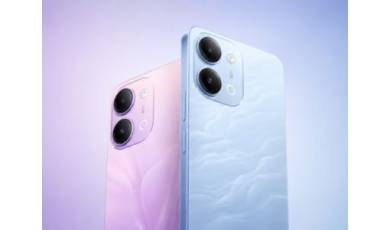
vivo has released the mid-range Y60 smartphone. Key features of the model include a durable build, a high-capacity battery with reverse charging, and a display with a high refresh rate.