



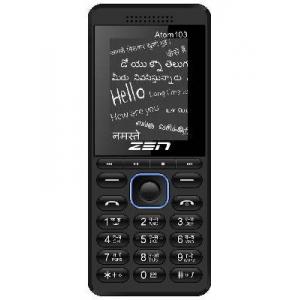
Secret codes for Zen Atom 103
Mobiles >> Zen >> Zen Atom 103| Specifications | Reviews | Secret codes |
Zen secret codes
*#06# - IMEI (International Mobile Equipment Identity) numberGSM codes for Zen Atom 103
Change PIN code - **04* and enter the old PIN code, and twice a new PIN code.
Change PIN2 code - **042* and enter the old PIN2 code, and twice the new PIN2 code.
Unlock SIM (PIN) - **05* and enter the PUK code and new PIN code twice
Unlock SIM (PIN2) - **052* and enter the PUK2 code and new PIN2 code twice
Call Forwarding (you have to order the service from the operator)
| ##002# | Cancelling all call forwarding |
| ##004# | Cancel all conditional call forwarding |
| **004* phone number # | Activate all conditional call forwarding |
Unconditional call forwarding (Call Forward All)
| ###21 | Switch off and deactivate |
| #21# | Deactivate |
| **21*phone number# | Enable and Activate |
| *21# | Activate |
| *#21# | Check the condition |
Diversion in case of "no answer"
| ###61 | Switch off and deactivate |
| #61# | Deactivate |
| **61* phone number# | Enable and Activate |
| *61# | Activate |
| *#61# | Check the condition |
Diversion in case of "not available"
| ### 62 | Switch off and deactivate |
| # 62 # | Deactivate |
| ** 62 *phone number# | Enable and Activate |
| * 62 # | Activate |
| * # 62 # | Check the condition |
Diversion in case of "busy"
| ###67 | Switch off and deactivate |
| #67# | Deactivate |
| **67*phone number# | Enable and Activate |
| *67# | Activate |
| *#67# | Check the condition |
Call Barring (you have to order the service from the operator)
Change the password for all bans (default - 0000)
- ** 03 * 330 * old password * new password * new password #
Barring of all outgoing calls
**33*(enter password)#@ - Activation code
#33*(enter password)#@ - Deactivation code
*#33#@ - Check Status
Barring of all calls
*330*(enter password)# - Activation code
#330*(enter password)# - Deactivation code
*#330# - Check Status
Block outgoing international calls
*331*(enter password)# - Activation code
#331*(enter password)# - Deactivation code
*#331# - Check Status
Block all outgoing international calls on your phone when roaming
*332*(enter password)# - Activation code
#332*(enter password)# - Deactivation code
*#332# - Check Status
Blocking of all outgoing calls
*333*(enter password)# - Activation code
#333*(enter password)# - Deactivation code
*#333# - Check Status
Barring of all incoming calls
*353*(enter password)# - Activation code
#353*(enter password)# - Deactivation code
*#353# - Check Status
Barring all incoming calls when roaming
*351*(enter password)# - Activation code
#351*(enter password)# - Deactivation code
*#351# - Check Status
Call waiting (you have to order the service from the operator)
*43# - Activation code
#43# - Deactivation code
*#43# - Check Status
Transfer your phone number (Anti ANI)
#30#phone number - Block
*30#phone number - Allow
*#30# - Check Status
Show phone number of the caller you (ANI)
#77# - Block
*77# - Allow
*#77# - Check Status
Proceed with Caution: Use codes with care, as incorrect usage could affect device functionality.
If you're unsure about a code, do not use it. It's better to be safe than sorry.
 | Tarik Tonkov Mobile technology specialist |
| Tarik Tonkov is a computer scientist and programmer turned tech journalist with a keen interest in the world of smartphones and tablets. He previously wrote for Android Life and was also a ghostwriter for several technology and automotive publications. He appreciates the reliability and beauty of smartphones, the symbiosis of characteristics and usability. In his free time, Tarik likes to travel by car and polish his programming skills to create small useful programs. | |
Comments, Questions and Answers about the secret codes of Zen Atom 103
| Sumit santa | September 06, 2023 | |
| My phone all rest seting how not a password support | ||
| Atom 103 | January 31, 2023 | |
| Reset all kaise kare | ||
| Vikas | September 07, 2022 | |
| Lock laga ke bhul gaye thodna hai please request you and help me | ||
| vikas | September 07, 2022 | |
| Lock kese thode | ||
| Ganesh | September 17, 2021 | |
| Factorydatareset | ||
| Kamlesh | August 04, 2021 | |
| Factory data reset | ||
| Deepak Yadav | July 18, 2021 | |
| Activate sim | ||
| zen | June 23, 2021 | |
| inpt passport 4-8 digite passport | ||
| Dk | October 20, 2019 | |
| Mobile zen Model power 102 Ka hard reset code | ||
Ask a question about Zen Atom 103
HMD has confirmed the launch date for its new budget smartphone, the Vibe 2 5G. In an official render, the company revealed the device's design, disclosed its color options, and confirmed some key specifications.
realme has officially confirmed the launch date for its new realme 16T 5G smartphone. At the same time, details about the design of the upcoming device and some of its technical specifications have been revealed.

vivo has released the mid-range Y60 smartphone. Key features of the model include a durable build, a high-capacity battery with reverse charging, and a display with a high refresh rate.