

Secret codes for E-tel Premier I20
Mobiles >> E-tel >> E-tel Premier I20| Specifications | Reviews | Secret codes |
| Unlock phone | Root phone |
| Backup | Flash Firmware | Screenshot |
E-tel secret codes
*#06# - IMEI (International Mobile Equipment Identity) numberANDROID E-tel secret codes for E-tel Premier I20
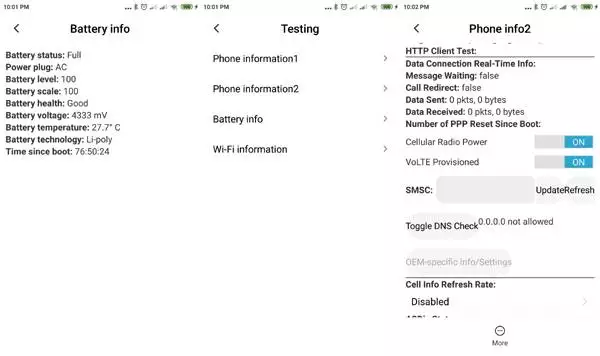
*#*#4636#*#* - Testing menu: Phone, Battery, Usage, WiFi Information. 4 menus will appear on the phone screen: (Phone information, Battery information, Battery history, Usage statistics)
*#*#225#*#* - Event calendar
*#*#426#*#* - Google Play services android.
*#*#759#*#* - Rlz Debug UI. Unique Device ID, PID, ACAP
*#*#36245#*#* - This code show email debug informations
*#*#8255#*#* - Google Talk Service Monitor in Android mobile phones will monitor Google Talk host address and port, your Google JID, your device ID, GTalk connection status, your connection history
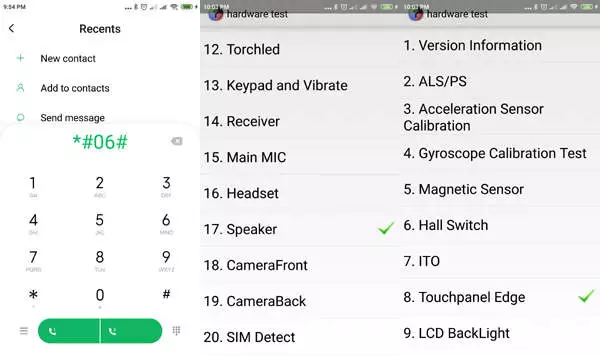
*#*#64663#*#* - Used to launch Hardware Test
*#2886# - Factory Auto Testing
*#*#273282*255*663282*#*#* OR *#*#273283*255*663282*#*#* - file copy screen (backup media files)
*#*#7780#*#* - This code erases all your mobile data. It'll remove following things: (Downloaded applications, Google account, all data and settings)
*2767*3855# - This code is used for factory format.
*#*#7594#*#* - Changing the power button behavior-Enables direct poweroff once the code enabled
*#*#34971539#*#* - E-tel Premier I20 Camera Information.
*#*#97#*#* - Language and Keyboard settings in E-tel Premier I20
*#872564# - USB logging control
*#301279# - Display of the HSDPA/HSUPA Control Menu
*#9900# - System dump mode E-tel Premier I20
*#*#46*#*# - Reset Sim in E-tel Premier I20
*#*#197328640#*#* - Enter service mode to run various tests and change settings
WLAN, GPS and Bluetooth Test Codes:
*#*#232339#*#* OR *#*#526#*#* OR *#*#528#*#* - WLAN test (Use "Menu" button to start various tests)
*#*#232338#*#* - Get Wi-Fi Mac address
*#*#1472365#*#* - GPS test
*#*#1575#*#* - For a more advanced GPS test
*#*#232331#*#* - Bluetooth test
*#*#232337#*# - Shows Bluetooth device address in E-tel Premier I20
GSM codes for E-tel Premier I20
Change PIN code - **04* and enter the old PIN code, and twice a new PIN code.
Change PIN2 code - **042* and enter the old PIN2 code, and twice the new PIN2 code.
Unlock SIM (PIN) - **05* and enter the PUK code and new PIN code twice
Unlock SIM (PIN2) - **052* and enter the PUK2 code and new PIN2 code twice
Call Forwarding (you have to order the service from the operator)
| ##002# | Deactivate call forwarding |
| ##004# | Cancel all conditional call forwarding |
| **004* phone number # | Activate all conditional call forwarding |
Unconditional call forwarding (Call Forward All)
| ###21 | Switch off and deactivate |
| #21# | Deactivate |
| **21*phone number# | Enable and Activate |
| *21# | Activate |
| *#21# | Check the condition |
Diversion in case of "no answer"
| ###61 | Switch off and deactivate |
| #61# | Deactivate |
| **61* phone number# | Enable and Activate |
| *61# | Activate |
| *#61# | Check the condition |
Diversion in case of "not available"
| ### 62 | Switch off and deactivate |
| # 62 # | Deactivate |
| ** 62 *phone number# | Enable and Activate |
| * 62 # | Activate |
| * # 62 # | Check the condition |
Diversion in case of "busy"
| ###67 | Switch off and deactivate |
| #67# | Deactivate |
| **67*phone number# | Enable and Activate |
| *67# | Activate |
| *#67# | Check the condition |
Call Barring (you have to order the service from the operator)
Change the password for all bans (default - 0000)
- ** 03 * 330 * old password * new password * new password #
How to block all outgoing calls
**33*(enter password)#@ - Activation
#33*(enter password)#@ - Deactivation
*#33#@ - Check Status
Block calls
*330*(enter password)# - Activation
#330*(enter password)# - Deactivation
*#330# - Check Status
All outgoing international calls barring
*331*(enter password)# - Activation
#331*(enter password)# - Deactivation
*#331# - Check Status
Block outgoing international calls when roaming
*332*(enter password)# - Activation
#332*(enter password)# - Deactivation
*#332# - Check Status
All outgoing calls barring
*333*(enter password)# - Activation
#333*(enter password)# - Deactivation
*#333# - Check Status
How to block of all incoming calls
*353*(enter password)# - Activation
#353*(enter password)# - Deactivation
*#353# - Check Status
Block incoming calls when roaming
*351*(enter password)# - Activation
#351*(enter password)# - Deactivation
*#351# - Check Status
Call waiting (you have to order the service from the operator)
*43# - Activation
#43# - Deactivation
*#43# - Check Status
Transfer your phone number (Anti ANI)
#30#phone number - Block
*30#phone number - Allow
*#30# - Check Status
Show phone number of the caller you (ANI)
#77# - Block
*77# - Allow
*#77# - Check Status
Proceed with Caution: Use codes with care, as incorrect usage could affect device functionality.
If you're unsure about a code, do not use it. It's better to be safe than sorry.
 | Tarik Tonkov Mobile technology specialist |
| Tarik Tonkov is a computer scientist and programmer turned tech journalist with a keen interest in the world of smartphones and tablets. He previously wrote for Android Life and was also a ghostwriter for several technology and automotive publications. He appreciates the reliability and beauty of smartphones, the symbiosis of characteristics and usability. In his free time, Tarik likes to travel by car and polish his programming skills to create small useful programs. | |
Comments, Questions and Answers about the secret codes of E-tel Premier I20
Ask a question about E-tel Premier I20
HMD has confirmed the launch date for its new budget smartphone, the Vibe 2 5G. In an official render, the company revealed the device's design, disclosed its color options, and confirmed some key specifications.
realme has officially confirmed the launch date for its new realme 16T 5G smartphone. At the same time, details about the design of the upcoming device and some of its technical specifications have been revealed.
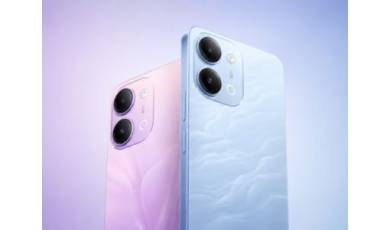
vivo has released the mid-range Y60 smartphone. Key features of the model include a durable build, a high-capacity battery with reverse charging, and a display with a high refresh rate.