

How to root Samsung W2013.
Mobiles >> Samsung >> Samsung W2013| Specifications | Reviews | Secret codes |
| Unlock phone | Root phone | Bypass FRP |
| Backup | Flash Firmware | Screenshot |
How to root Samsung W2013?
There is a lack of functionality on your Android smartphone Samsung W2013? You want to get root access on this smartphone?What is Root Android?
Root, or as it is also called the superuser, is needed to extend the functionality of the Android operating system.
In particular, on Unix and Android OS, users who perform actions (watching video, listening to audio, editing documents), work with the rights of guests, then they cannot edit or change / delete / modify system files, increase functionality. In the system, only the main administrator or as he is called the superuser (root) has this function.
What features does Root have on Android:
- Install third-party firmware, and custom ROMs.
- Remove unwanted advertising from applications.
- Remove apps and ringtones installed from the factory.
- Ability to modify system files: Recovery image, Bootloader.
- Increase the battery life.
- Increase the performance of android applications.
- Use a memory card to install applications.
What are the dangers of getting root access?
- A rooted phone cannot be repaired under the lost warranty.
- You will lose the ability to update the software on your phone.
- Your phone may break during this operation.
There are several universal tools that automate the root process and make them available to even the most novice users. One of the most famous is "Framaroot". This program allows you to root a very large number of different devices. And even if the name of your gadget is not listed in the list of supported ones, it still makes sense to try, because the probability of getting root is quite high.
Please charge and restart your phone before starting the operation.
To get root through the "Framaroot" program, follow these steps.
1. You need to download and install the latest version of the 'Framaroot' app on your phone.
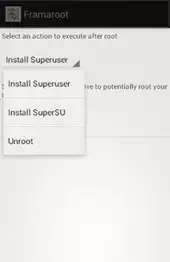
2. Run the program. If your phone can be rooted, you will see a drop-down list of possible actions.
3. Choose one of the two options and wait for the message on the screen about the rooting result. If one method doesn't work, choose another..
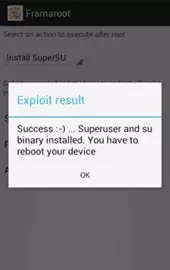
4. As soon as you receive a notification on the screen that the phone has been successfully rooted, restart the device.
Summary: OS: Android 4.0.4 Ice Cream Sandwich; Processor: Samsung Exynos 4412 1,40 GHz; Number of cores: 4; GPU: ARM Mali-400 MP4 @440 MHz; Internal memory: 16 GB; Memory cards: microSD, microSDHC, microSDXC, max 64 GB; Main display: Super AMOLED 16M colors 480 x 800 px (3.70") 252 ppi; Addidtional display: Super AMOLED 16M colors 480 x 800 px (3,7"); Touchscreen: Yes; Digital camera: 8 Mpx, 3264x2448 px; Flash: Yes; Secondary camera: 2 Mpx, 1600x1200 px; Video: H.263, H.263, MPEG4 - 30 fps, 1920x1080 px; MP3: Yes; Speakerphone: Yes; Bluetooth: Yes, v4.0; NFC: -; GSM frequencies: 900/1800/1900; Standard UMTS: 900/2100; GPS: Yes; WiFi: Yes, v802.11 a/b/g/n; EDGE: Yes, class 12; GPRS: Yes, class 12; U ...
 | Tarik Tonkov Mobile technology specialist |
| Tarik Tonkov is a computer scientist and programmer turned tech journalist with a keen interest in the world of smartphones and tablets. He previously wrote for Android Life and was also a ghostwriter for several technology and automotive publications. He appreciates the reliability and beauty of smartphones, the symbiosis of characteristics and usability. In his free time, Tarik likes to travel by car and polish his programming skills to create small useful programs. | |
Comments, Questions and Answers about Samsung W2013
Ask a question about Samsung W2013
Honor has added the mid-range Play 80 Plus smartphone to its lineup, featuring a high-capacity battery, an IPS display, and a Snapdragon processor. It also features a dedicated button for accessing AI functions.
Following the Play 70C, Play 80 Plus, and Play 11C, Honor has released a new smartphone in the series?the 11 Plus. Its key features include an AMOLED screen with a high PWM frequency and a high-capacity battery, combined with a slim body.

Following the launch of its new tablet, HUAWEI has introduced the nova 15 Max smartphone to the global market. The device emphasizes long battery life and advanced photography capabilities, allowing users to capture high-quality images even at night.